Grid Path Visualizer
Team Size: Solo Project | Duration: 4 weeks
Grid pathfinding algorithm visualizer built from scratch using C++17 and SDL2, featuring step-by-step visualization of BFS, DFS, Dijkstra, A*, and FlowField algorithms
Project Overview
When I was working on the Berserker Girl I had chance to implement the Flow Field pathfidning algorithm in the UE5, which inspired me to look into other pathfinding algorihtm, I wanted to strengthen my pure C++ skill I have decided to choose framework rather than game engine. so I have decided to use SDL2.
View Full Source Code on GitHub
Download Windows Executable
Features
Pathfinding Algorithms
Custom UI System
Interactive Grid Editing
Challenges & What Could Be Done Better
Pathfinding Algorithms
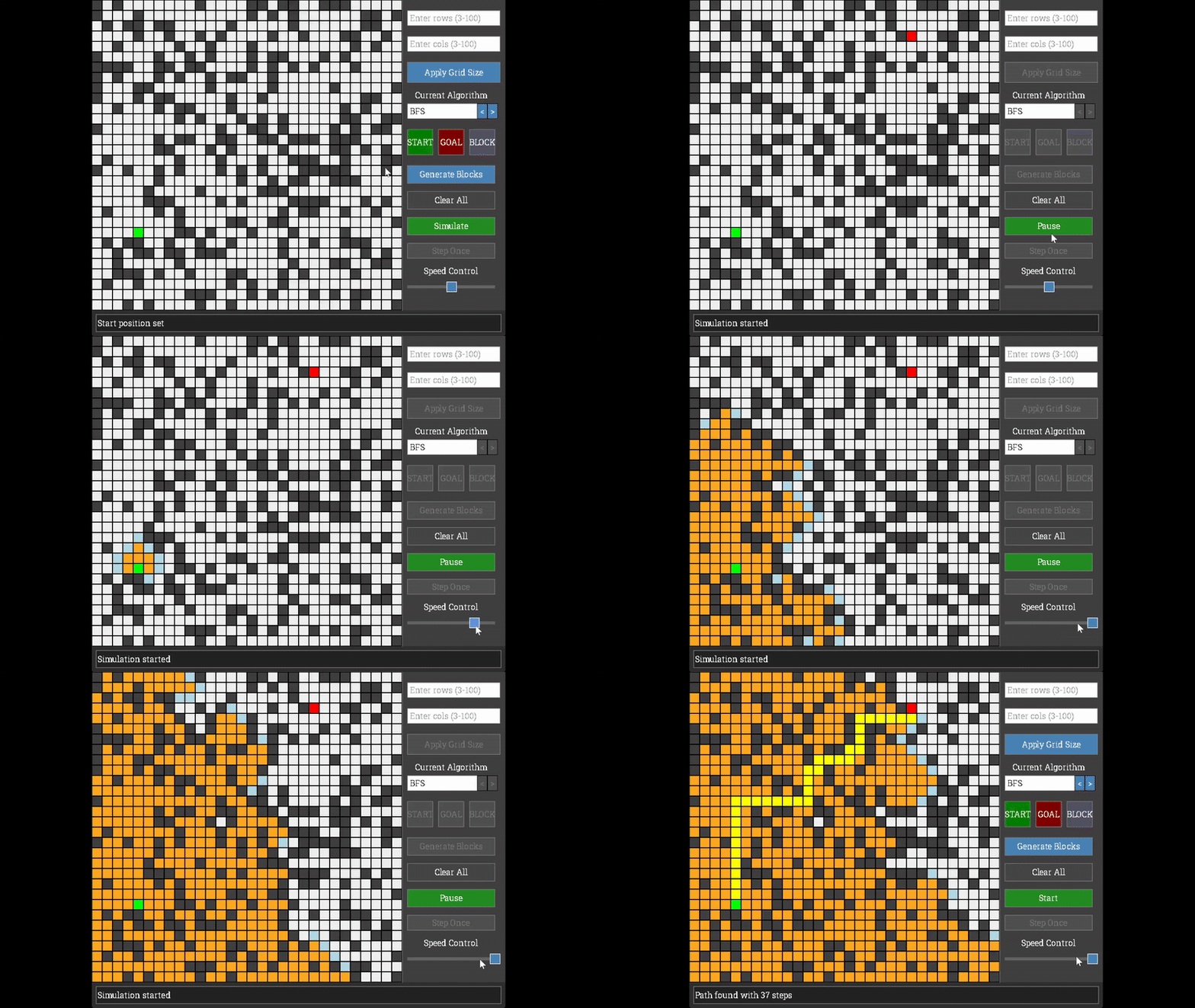
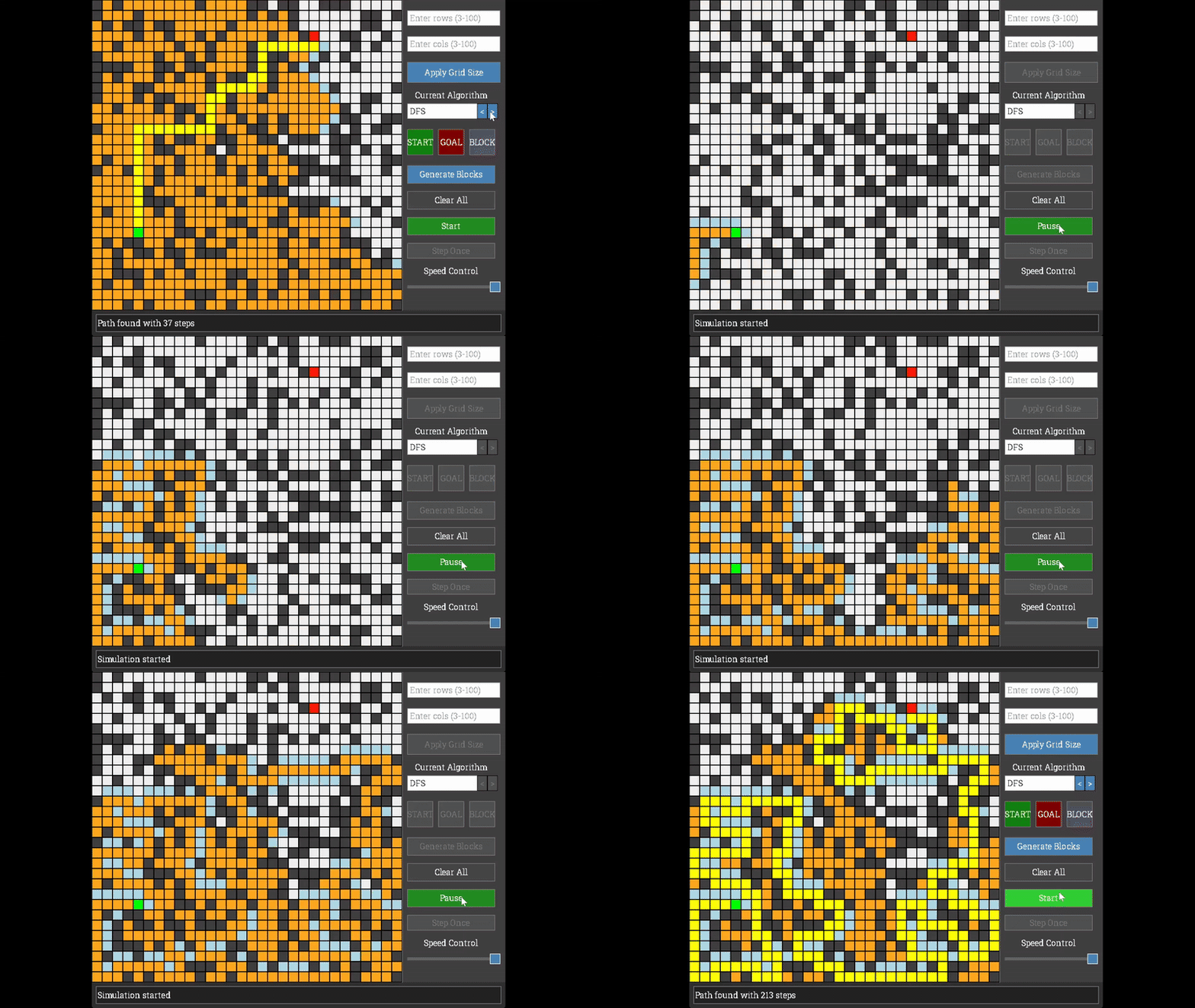
Implemented Five Algorithms
Breadth-First Search (BFS)
- Explores the grid layer by layer, guaranteeing the shortest path in unweighted grids
- Time Complexity: O(N) where N = rows × cols
- Space Complexity: O(N) for queue + visited set + parent map
Depth-First Search (DFS)
- Explores paths deeply before backtracking
- Time Complexity: O(N)
- Space Complexity: O(N) worst case for stack
Dijkstra’s Algorithm
- Optimal for weighted grid pathfinding, considers cell weights for movement cost
- Time Complexity: O(N log N)
- Space Complexity: O(N) for priority queue + distances + visited
A* Search
- Educated guess search using Manhattan distance heuristic
- More efficient than Dijkstra by prioritizing cells closer to the goal
- Time Complexity: O(N log N)
- Space Complexity: O(N) for open/closed sets + cost maps
FlowField
- Generates a navigation field for the entire grid
- Useful for multiple entities moving toward the same target
- Time Complexity: O(N log N) for distance calculation + O(N) for flow vectors
- Space Complexity: O(2N) for distances + flow vectors
Step-by-Step Visualization
/**
 * BFS algorithm step - returns shortest path in unweighted grid
 * Time Complexity: O(N) where N = rows * cols
 * Space Complexity: O(N) for queue + visited set + parent map
 */
bool Pathfinding::stepBFS(Grid& grid) {
    if (!m_isInitialized || m_pathFound || m_bfsState->queue.empty()) {
        return false; // Pathfinding done or not initialized
    }

    // Process the next position in the queue
    Position current = m_bfsState->queue.front();
    m_bfsState->queue.pop();

    // Get current cell and mark as visited
    Cell& currentCell = grid.getCell(current);
    if (currentCell.state != CellState::START &&
        currentCell.state != CellState::GOAL) {
        currentCell.state = CellState::VISITED;
    }

    // Check if we found the goal
    if (current == m_currentGoal) {
        m_pathFound = true;
        reconstructPath();
        return false; // Done
    }

    // Add neighbors to the queue
    std::vector<Position> neighbors = getNeighbors(grid, current);

    for (const Position& neighbor : neighbors) {
        if(m_bfsState->visited.find(neighbor) == m_bfsState->visited.end()){
            Cell& neighborCell = grid.getCell(neighbor);

            if (neighborCell.state != CellState::BLOCKED){
                m_bfsState->queue.push(neighbor);
                m_bfsState->visited.insert(neighbor);
                m_bfsState->parent[neighbor] = current;

                // Mark neighbor as queued
                if (neighborCell.state == CellState::EMPTY) {
                    neighborCell.state = CellState::QUEUED;
                }
            }
        }
    }
    return true;
}
Each algorithm is implemented with a step() function that processes one iteration at a time, allowing for step by step visualization. The simulation can be paused, stepped through manually, or run at adjustable speeds.
UI Component System
Inspired by Unity’s component-based UI system, I created a custom UIComponent base class that all UI elements inherit from:
class UIComponent {
public:
    virtual void render(SDL_Renderer* renderer, TTF_Font* font) = 0;
    virtual void handleEvent(SDL_Event& e) = 0;
    virtual bool isActive() const { return m_isActive; }
    virtual void setActive(bool active) { m_isActive = active; }

protected:
    bool m_isActive = true;
    SDL_Rect m_bounds;
};
Custom UI Elements Built
- Button - Click callbacks, hover states, custom colors
- Slider - Speed control for visualization
- ComboBox - Algorithm selection dropdown
- InputTextBox - Grid size input with validation
All UI components are managed through a central registration system, making it easy to add, remove, or modify UI elements.
For example, here’s how the “START” button is configured to enable users to set the starting position on the grid:
// GridPathVisualizer.cpp - Setting Start Button
    // Set up button properties
    m_setStartButton.setPosition(widgetPanelX, currentY);
    m_setStartButton.setSize(buttonSize, buttonSize);
    m_setStartButton.setText("START");
    m_setStartButton.setColors(
        Colors::Button::Start::NORMAL,
        Colors::Button::Start::HOVER,
        Colors::Button::Start::PRESSED,
        Colors::Button::BORDER
    );
    // Set up what happens on Button click
    m_setStartButton.setOnClick([&](){
        m_currentMode = InteractionMode::SET_START;
        setStatusMessage("Click on the grid to set start position");
    });
    // Register for Event handling and Rendering updates
    addUIComponent(m_setStartButton);
Grid Editing
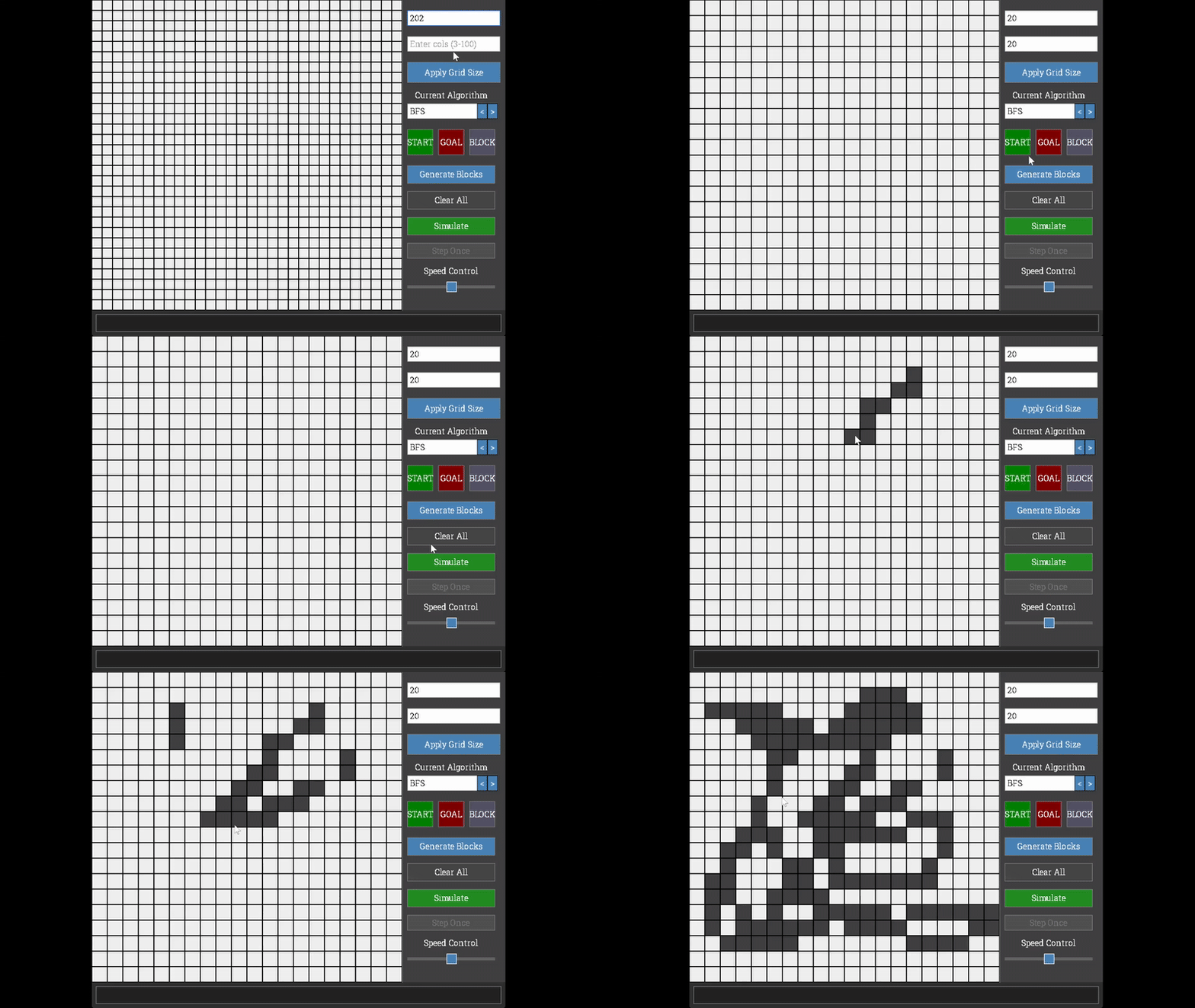
Interactive Features
- Dynamic Grid Sizing: Adjust grid from 3×3 to 100×100 cells
- Manual Cell Editing: Place start, goal, and obstacles by clicking
- Drag-to-Paint: Hold and drag to paint multiple obstacle cells
- Random Generation: Auto-generate random obstacles or weighted cells
- Weight Visualization: Cells display their movement cost for weighted algorithms
void GridPathVisualizer::handleMouseEvent(SDL_Event& e) {
    // ... other event handling code ...

    if (e.type == SDL_MOUSEBUTTONDOWN && e.button.button == SDL_BUTTON_LEFT) {
        int mouseX = e.button.x;
        int mouseY = e.button.y;

        Position clickedPos = m_grid.screenToGrid(mouseX, mouseY);

        if (m_currentMode == InteractionMode::DRAW_OBSTACLE) {
            m_grid.toggleObstacle(clickedPos);
            m_isDragging = true;  // Enable drag-to-paint
        }
    }

    // Handle drag-to-paint while mouse is held
    if (e.type == SDL_MOUSEMOTION && m_isDragging) {
        Position currentPos = m_grid.screenToGrid(e.motion.x, e.motion.y);
        if (currentPos != m_lastDrawPos) {
            m_grid.toggleObstacle(currentPos);
            m_lastDrawPos = currentPos;
        }
    }

    // Stop dragging when mouse is released
    if (e.type == SDL_MOUSEBUTTONUP) {
        m_isDragging = false;
    }
}
Project Architecture
Key Components
Grid Class
- Core visualization and rendering engine
- Manages cell states, weights, and flow vectors
- Handles mouse interaction for cell editing
Pathfinding Class
- Algorithm implementations with step-by-step execution
- Unique state structs for each algorithm (BFSState, DFSState, etc.)
- Unified
step()interface for all algorithms
GridPathVisualizer Class
- Main application controller
- SDL window and renderer management
- UI component registration and event handling
- Simulation state management (IDLE, RUNNING, PAUSED, COMPLETED)
UIComponent Class
- Base class for all custom UI elements
- Supports customizable text and color properties in derived implementations
- Enables automatic event handling and rendering through component registration system
Technical Highlights
Why std::unique_ptr over inheritance?
Initially considered creating child classes for each pathfinding algorithm (e.g., BFSPathfinder, DijkstraPathfinder). However, I opted for a unified Pathfinding class with algorithm-specific state structs managed by std::unique_ptr, which provided:
- Consolidated logic in a single file vs. scattered across multiple classes
- Lazy state allocation (only when algorithm is selected)
- Automatic memory cleanup when states are destroyed
- Simplified algorithm switching without complex inheritance hierarchies or lengthy initialization lists
What I Learned
- SDL2 Framework: Window management, rendering pipeline, event handling, TTF text rendering
- Component-Based Architecture: Designing reusable UI components with inheritance
- State Management: Using state machines and unique pointers for clean algorithm switching
- Build Systems: CMake configuration for cross-platform C++ projects
Through this project, I was able to solidify my understanding of pathfinding algorithms, how the SDL framework handles events, and component-based architecture.
References
- Main Loop & SDL Events: Game Programming in C++
- SDL2 Tutorials: Lazy Foo’ Productions
- Pathfinding Theory: University of Utah CS courses